Just click on one of the names below to email that person.
Secretary: Dennis Remnant: Contact Dennis for all matters relating to the club - new enquiries, general points and so on.
Founder: Tony Rednall - and model-builder extraordinaire!
Webmaster: Michael Poxon: Contact Michael for enquiries about, or submissions to, the website.
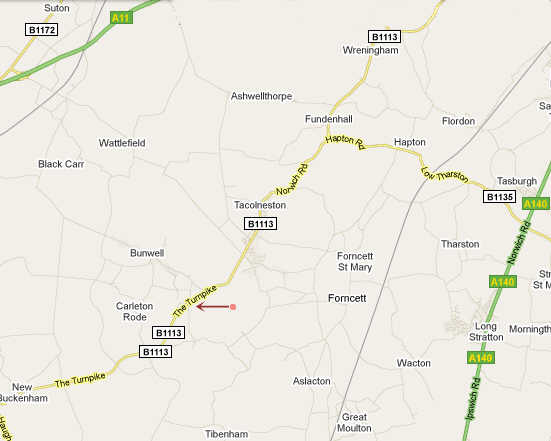
We meet at Bunwell Village Hall which is on the B1113 road.
Users of Satnav or internet map facilities should note that the Postcode is NR16 1RY. Here is a map.
There is good news and bad news about computers. First the good news... contrary to the fears of science fiction writers, computers aren't going to take over the world. Why? Well, they are so unbelievably stupid. We have to tell them to do everything (print, change the font size, open the word processor...). Now the bad news... it's you that has to do the telling!
First: your digital camera has no idea what you're taking a picture of, since it's even more stupid than a computer. But it suspects that at some time you might want to (say) print a photo, send it to someone, or put it on the web, and with that in mind gives you a huge-sized rectangular picture, typically about 2400 by 1200 pixels - that's about three to four times the area of most computer screens! It does this so that if you want to reduce your picture, to go on a website for example, you can then shrink it with no loss of detail. That's why all digital cameras come with "image software" so you can do things with your picture - make it lighter, change the colours, and so on.
Second: let's assume you want to reduce your picture from 2400 x 1200 pixels to one that's a third as small on each side, so your new version will be 800 x 400 pixels in size. The size of the file itself will also be much smaller, which is good because (a) It won't take so long to send by e-mail! (b) It will load quicker if someone is looking at it on the internet, which is what we want here.
Third: Obviously I don't know what image software each of you has, but whatever it is, it should allow you to resize the picture. The really important thing to bear in mind is to ensure that the proportions remain the same. Usually there will be a "dialog box" that lets you resize, and somewhere there you should find a tick-box or something similar that will say something like "maintain proportions", "keep same ratio" or something similar. Make sure this is ticked! (It's often already ticked for you, but make sure first)
Fourth: Again, because your camera is as daft as your average Arsenal fan (tee hee!) it doesn't know what your picture is of - so it will give it a serial number, usually something like "IMG0001". When you save your new, resized, all-singing all-dancing picture, choose "save as", and call it something meaningful like huge crane. That will also ensure that your original, large-sized picture is still there, in case you want to print it out later or whatever.
Finally: image formats - there are several types of image format that computers can 'understand', each of which is slightly different, and uses different algorithms (complicated mathematical stuff, you really don't want to know!) to process the picture. These formats have industry-accepted file extensions such as .bmp, .tif, .jpg and several more, most of them now outdated. For instance, your camera may save photos in .bmp format. What you want is the .jpg type, if it isn't already pre-chosen for you by your camera. Don't pick .gif as your photo will come out looking awful!
Hope this has been of use!